

Tectite FormMail
FormMail accepts contact form submissions (any HTML form) from your website and emails the results to you (and lots of other things too!).


Free (D-I-Y setup)
Tectite FormMail is a PHP form to email processor for all HTML web forms, and is ideal for spam-free contact forms. It's completely free for all use and open source! Download and set it up for your website using our online documentation.
Low-cost Wizard
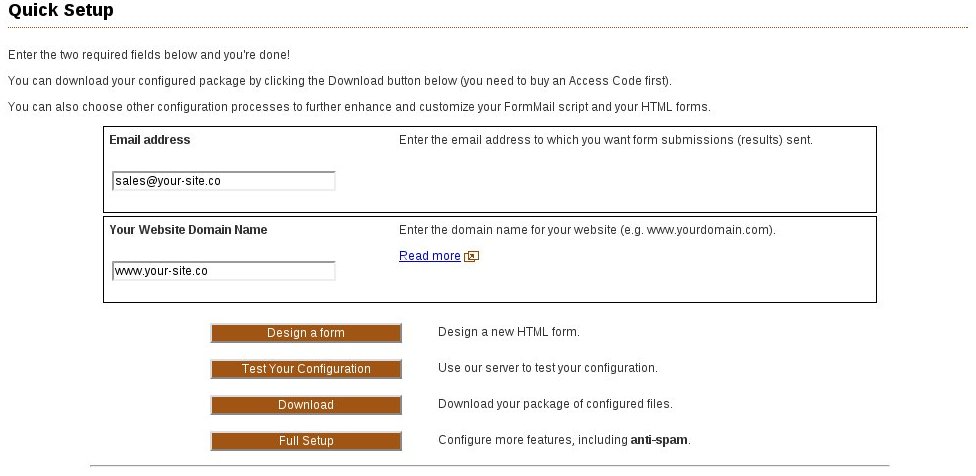
Save time and effort and get started quickly with a low-cost subscription to our Configuration Wizard. This is the easiest and quickest way to get your PHP form processor configured for your contact form (you can also design your own web forms).
Anti-spam
FormMail has automatic anti-spam processing that keeps form spam out of your inbox. Select even more anti-spam features for your specific requirements. This is a critical feature when you select your form to email system.
Supports Google's reCaptcha v2 and Invisible reCaptchaOpens in a new window
Secure
Tectite FormMail has a long history with no serious security vulnerabilities - a major reason to select the right PHP form processor.
Support & Development
- You can purchase guaranteed support from the authors and get a real response from a real person!
- Tectite FormMail is under active development with more features and enhancements becoming available all the time. Check back regularly!
Features
FormMail has an extensive and growing list of features. The commonly used features are shown below.

-
Send email
FormMail sends form submissions to your email inbox (supports any number of email recipients).
FormMail endeavors to make the email come From the user filling in the form. This means you can simply hit Reply to respond to their form submission.
-
Hide email addresses
Obfuscate email addresses to prevent SpamBots from harvesting your email addresses.
Or (even better!) use the server-side EMAIL_ADDRS setting or an INI file to completely hide your email addresses from view.
-
CSV files
Store form submissions in a CSV (comma separated values) database on your server.
CSV files are a standard way of storing data for import into spreadsheet programs (such as MS Excel and OpenOffice), relational databases (such as MS Access and MySQL), and other desktop and server apps.
-
Eliminate form to email spam
FormMail blocks spam through automatic attack detection tests as well as optional features such as image verification (CAPTCHA), and Reverse Captcha.
Our HTML form processor is a complete anti-spam solution.
-
Encryption
Encrypt form submissions before they are emailed to you (ideal for securely collecting credit card or other private data).
Works with HTTPS (SSL/TLS) to provide a secure end-to-end communication channel between your customers and you.
-
Redirect on success
Display a custom "thank you" page or redirect the user to a specific URL on success.
For example, use this feature to allow a user to download a file after filling in your form.
-
Redirect on failure
Redirect the user to a custom error page.
Use our Advanced Error Handling features to allow the user to return to the form without losing what they've already entered.
-
Strong field validation
Perform strong field validation on the server side to help ensure you only receive useful form submissions.
-
Template your web form submissions
Receive web form results in the format you want.
You can create plain text templates for plain text emails or create HTML templates to receive richly formatted HTML emails.
-
File uploads
Accept uploaded files from your forms.
FormMail attaches uploaded files to the email you receive, or it can store them on your server.
-
Logging
Create a log file of form activity on your server.
Use this to monitor activity or as an audit log to ensure your business processes all forms submitted.
-
Auto responding
FormMail can send an email back to the person who filled in the form.
You can use a template to format this auto response and include fields they entered on your form.
-
GeoIP support
Use the MaxMind service to gain location information about the people filling in your forms.

Special Requirement?
Converting from Matt's or NMS FormMail
Many webmasters are converting from Perl FormMail scripts (such as Matt's FormMail or NMS FormMail) to Tectite's PHP FormMail. In most cases, our Upgrade Wizard can do this for you instantly and for free!
Once converted, you'll want to check out the many features of Tectite FormMail, and read through our How-To guides to see what you can now do with your forms.
You may be very interested in setting up additional anti-spam features.
Your server or ours?
FormMail was specifically designed for you to install on your server, so that your forms are processed by your server.
However, some hosting providers don't install PHP correctly, or don't allow scripts to easily send email. In this case, try our Hosted Forms service.
Perl or PHP?
Should you use a form processor written in Perl or PHP? Since you're not the programmer, it probably doesn't matter much.
However, Perl is a very old computer language and was designed for general scripting on computers before the World Wide Web existed.
Many of the original form processors and other web scripts were written in Perl, and some have been responsible for major security breaches. While this isn't the fault of Perl itself, the complexity of the language doesn't make it easy for programmers to write secure code.
In contrast, PHP is a much newer language and was specifically designed to work with websites.
Since 2000, many major websites and web services have been created using PHP.
For these reasons, we strongly recommend you select a PHP form processor.
Get It Now


After wasting a lot of time with other scripts, I have just succeeded using FormMail with the first web form that I have set up by myself.
I'm most impressed with the care and effort that you put into the error message system - they actually indicate where the errors are (mine of course)!
I've been an non-expert PC user for over 20 years and never thought that I would see the day!

Australia
Just downloaded your formmail script. It works great. Your instructions are very clear and very helpful. This is a very well thought-out and well implemented piece of software. Thank you so much.

Seattle, WA
Resources
- Configuration Wizard Configure FormMail and convert your existing HTML forms in minutes.
- Form Designer Design your own HTML forms using our online Form Designer (part of our Configuration Wizard).
- Getting started tutorial Learn how to setup FormMail and your HTML forms manually.
- About HTML forms Learn how web forms work.
- FormMail Configuration Reference Refer to the documentation for all configuration settings in FormMail.
- How-To guides Learn how to use advanced features in FormMail.
- Upgrade Wizard Upgrade your current Tectite FormMail version
General Information
A form is a part of a web page displayed in a browser. However, the form itself cannot do anything without a server computer.
Your browser "submits" the information you type into the form to this server computer, where a computer program (called a form processor) accepts, checks, and processes the information.
Form processors are normally "scripts" and Tectite FormMail is one of the most powerful form processors available.
If you have a website that needs a form (such as a contact form, feedback form, or any web form), you need a powerful anti-spam form to email processor such as Tectite FormMail.


